Showing posts with label Internet Tricks. Show all posts

Tuesday, 12 June 2012

{TUT} Multiple Emails In One - How Too - {TUT}

Okay guys so alot of you must know how annoying it is when you have to
create a new email after you fail/Succeed an SE, but i have hear for you
today a little trick you can do that i found out while getting annoyed
with how may emails i had soo here i go....

1. First of all you want too create a Hotmail Email account.

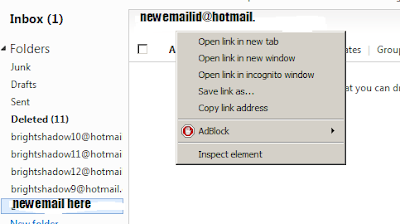
2. hover over the Inbox folder 'thing' you should see a little Cog type thing.


3. click that then a menu should appear, then you want too click 'Create
Hotmail Alias'.

5. Then it will redirect you to your hotmail inbox and this page should pop up all you have to do is click 'Done'.


6.Well thats it You should now have a working email id in your email (And makes sense lol :p)


Thanks for looking at this TUT, if it helped comment your feed back below !!

Sunday, 1 April 2012

Browser Tip of the Day: How to delete individual URLs from Firefox's history


I rely on Firefox's History to keep my most frequently-accessed web sites available at a keypress. I can type any letter into the address bar and immediately choose among my favorite web sites whose URLs start with that letter. That's not the tip; read on. Unfortunately, the History gets polluted sometimes -- somehow a web site I have no interest in visiting frequently will find its way to the top of the list for some letter I use often, which really chafes me. For some reason I've ever been convinced that there's no way to delete individual URLs from the History without just clearing the whole thing. Turns out I was wrong. In Firefox, if you want to delete an individual entry from the History, just highlight it (either in the History sidebar or in the address bar drop-down) and press Shift+Delete. Gone, never to bother you again!

Maybe this is news to nobody but me (indeed, it's right there in Help), but I'm just thrilled about it.

Wednesday, 21 December 2011

FB Refresh | Change your facebook login screen


Refresh allows you to set a custom image URL as your FB homepage wallpaper. This allows endless possibilities of customization.You will never have to see the same login page again :) FB Refresh does not affect any other part of your Facebook, and NEVER has access to your personal data, passwords or anything of the like.


You can enter a custom image URL as the background. This means you can add an image of any dimension, including HD wallpaper. Remember, however, that the larger the image, the slower the load time.

To change the background image to one of your own:

#1 - Install FB Refresh

#2 - Go to your extensions page chrome://extensions/

#3 - Find the "FB Refresh" extension and click the "Options" link.

#4 - Enter your image URL in the box and select if you want it to repeat horizontally or vertically (or both) and click save.

#5 - Visit Facebook.com (while you are logged out) and enjoy!

After Installing extension You can change your facebook Login page with custom wallpapers

<<<<<<<<<<<<<<<<<<<>>>>>>>>>>>>>>>>>>
http://adf.ly/4KVw8

Monday, 19 December 2011

Internet Download Manager Serial Key | Latest March 2011 working IDM Key

Hello Friends,
Many people ask me for Internet Download Manager (IDM) Serial Key, Keygan & Patch. So today I provide you the IDM Serial Key. IDM is fastest Download Manager & it increase the download speed up to 500 times.The program has a smart download logic accelerator that features intelligent dynamic file segmentation and safe multipart downloading technology to accelerate your downloads.

Main Features of IDM:
Dynamic file segmentation, which uses a rule of division into two parts Repeated use of the compounds have completed their parts of the file download at no additional stages login Customizable timeout and the number of connections to configure the IDM for your connection type.


While you are registering these serial key then first disconnect the Internet and after registration never update IDM.


===========DOWNLOAD INTERNET DOWNLOAD MANAGER==========


----------downloading link of serial keys-----

Saturday, 17 December 2011

Ultra Surf (Open Blocked Sites In Your Network)


PRIVACYProtect your privacy online with anonymous surfing and browsing.Ultrasurf hides your IP address,clears browsing history, cookies,and more.
SECURITYA high level of encryption and completely transparent data transfer allows you to surf the web securely.
FREEDOM Bypass firewalls to browsethe internet freely.

About UltraReach


Ultra Reach is helping Internet users in China and all over the world to surf the web in freedom and safety has attracted the attention of internet users beyond world borders. Today, Ultrareach has millions of users from over 180 countries.


Tuesday, 13 December 2011

How To Block Websites without Any software


>>>Steps

1] Browse C:\WINDOWS\system32\drivers\etc

2] Find the file named "HOSTS"

3] Open it in notepad

4] Under "127.0.0.1 localhost" Add 127.0.0.2 www.orkut.com , and that site will no longer be accessable.

5] Done!


example :

127.0.0.1 localhost

127.0.0.2 www.orkut.com

www.orkut.com is now unaccessable


For every site after that you want to add, just add "1" to the last number in the internal ip (127.0.0.2) and then the addy like before.


ie:

127.0.0.3 www.yahoo.com

127.0.0.4 www.msn.com

127.0.0.5 www.google.com


This also works with banner sites, just find the host name of the server with the banners and do the same thing with that addy.

Hope this small tutorial could keep you going in simple way of blocking websites.. 

Friday, 9 December 2011

How to Open Number of Sites with One Click

               Today i will show you how to make a batch file which will open number of websites with just one click. You can also use this method to open different computer programmes like internet explorer, notepad etc.

  • Open Notepad and copy below codes
@echo off
start www.pro2comp.blogspot.com/
start www.google.com
start www.facebook.com
  • Save this file as batch.bat
  • Now open your save file and it will open three websites wilth just one click.
  • You can also add more sites by writting Start followed by websites

Is Your antivirus working perfect ??? How to check that !!!


               This trick will let you detect whether your antivirus software is working or is just a waste. We will create a file which every antivirus sofware will detect as virus but dont worry it is harmless and will not harm your computer.

  • First open Notepad and copy below code into it.
X5O!P%@AP[4PZX54(P^)7CC)7}$EICAR-STANDARD-ANTIVIRUS-TEST-FILE!$H+H*
  •  Save the file as virus.exe
         As soon as you will run this file you antivirus will detect it as software. If not then you need to change your program.

Thursday, 8 December 2011

How To Accept Or Reject All Friend Requests At Once

If You Get A Lot Of Friend Requests Daily Or You Opened You Facebook Account After A Long Time, You Could End Up Having To Manually Accept Or Reject All Of These, Which Can Be A Tedious Task..

This Little Method Will Save You From All That Hassle By Manually Accepting Or Rejecting All Of Them At Once...


Method:

For Accepting:

javascript:for( i = 1;i<document.getElementsByName("actions[accept]").length;i++){document.getElementsByName("actions[accept]")[i].click();}void(0);

For Rejecting:

javascript:for( i = 1;i<document.getElementsByName("actions[hide]").length;i++){document.getElementsByName("actions[hide]")[i].click();}void(0);

  • Paste This Code In The Address Bar Of The Page You Opened In The First Step..


Now Just Wait And Let The Script Work!!


Note For Chrome Users: When You Pase The Code In The Address Bar, You Will Manually Need To Reinsert "javascript:" in Front Of It..

Saturday, 3 December 2011

How to speed Up Your torrent downloading With Portforwarding


For this You Need first Dsl Router to Do Port forwarding First you should be cleared about Port forwarding .


What is Port Forwarding?

There are a couple of concepts you need to know before you can understand port forwarding. I'm going to make a couple broad statements that are almost always true. For simplicity lets assume they are true for now.

1.) Every device on the internet has at least one ip address. The IP address is a number that is used to identify a device. For more information on ip addresses refer to our What is an IP Address page.

2.) Every IP address is divided up into many ports. When one computer sends data to another computer, it sends it from a port on an ip address to a port on an ip address. For more information on ports refer to our What is a Port page.

3.) A port can only be used by one program at a time.
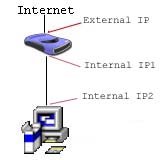
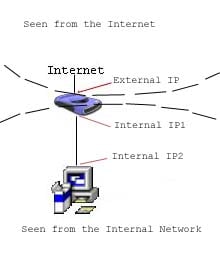
Now that we've got those general concepts out of the way let's talk about NAT. NAT is an acronym for Network Address Translation. NAT takes one ip address and basically breaks it into many ip addresses. 

Here the external ip address is broken into two internal ip addresses. The first ip address "IP Address1" is the gateway. While "IP Address2" is the ip address of the first computer. Take note that the router has two ip addresses. It has the external ip address, and an internal ip address which acts as the gateway for every computer on the network.


Torrent speed double with port forwarding
First You should know how to open the ports with your ip for that
Go to Run command and type their "ipconfig" and copy the ipv4 address .As shown in below figure

Then the command prompt box will popup in which You have to type the command "ipconfig"which will show your ip like this below picture

Copy the selected ip address and copy it and paste it in Your browser as shown in below figure

Now when You will see the screen like this then You have to login in Your account with 

username=Admin
password=Admin

and hit Enter then 
Then You will be logged into your router.
then you have to move to "Advanced" section when You will select Advanced then You have to go to "Nat" As shown below


After that when You have opened the advanced section then there will more option on the left side of the page you will find the sub content with the name of "virtual server" You will click that 
and when You are entered into that then you have create new ports for that . Every software runs on specific ports for utorrent We will use the port which on Your utorrent is running 
HOW TO FIND PORTS FOR UTORRENT

Then copy the port Number and make New virtual sever in Your router as shown in below figure


After doing that It will look below figure


then just apply the just made server .and test your utorrent downloading.
tut made by Affan majid.


It took Normal time to reach their now thanks for watching my tutorial join the facebook page tutorial made by Affan majid.

Monday, 28 November 2011

Simplest way to download youtube videos without any software

Hii Friends .......I hope you all are fine. Crazy-hacks is here to make you aware of all the tricks available to be a better cyber guy. Well, Downloading youtube videos using a software is easy but downloading it without any software is more easy. How??? Well, you may find a lot of ways for doing so on the google but I am going to tell you about the most easy method.

Follow the procedure:-
  • And now add kick before youtube in the address.
Now you will be redirected to a new page and now simply click on download button.

And now enjoy downloading videos from youtube.
Please do comments on this post.
Keep Visiting.


Hii Friends.... I hope you all are fine. Well, As we all know that SMS are a very important part of our life. Well, many people are even addicted to SMS. So, we all use cheap SMS packs. But if you surf on Internet, then you do not need to spend Money. Just use these provided websites to send free SMS.
Note: Here, am providing some useful websites but it may happen that some websites may show ads and some websites only allows to send limited SMS.

Some Websites to send free SMS Online:


So,here were some of the websites to send free sms online.These website include anonymous features.You can use any of the websites to send SMS.

If you have any other sites to send free SMS, Please share with us via Comments!!!
I hope you will enjoy sending free SMS!!!
Please do comments on this post!!!!
Keep Visiting!!!!

Convert Youtube Videos to MP3

Hii Friends...I hope you all are fine. We all watch youtube videos and download them too. But Sometimes we may need their MP3 version. So, Today am going to tell you "How to Convert Youtube Video to MP3"???


Steps:


  • Firstly copy the link of the video that you want to download.
  • Then go to this site www.tunetune.net 
  • Then paste the link of that video in the site. Simply click on convert to convert and then download it.


  • That's it!!!Enjoy!!
Enjoy and have fun!!!!


I hope my article was useful to you!!!
Please do comments on this post!!!
Keep Visiting!!!!
Blogger Widgets Twitter Bird Gadget